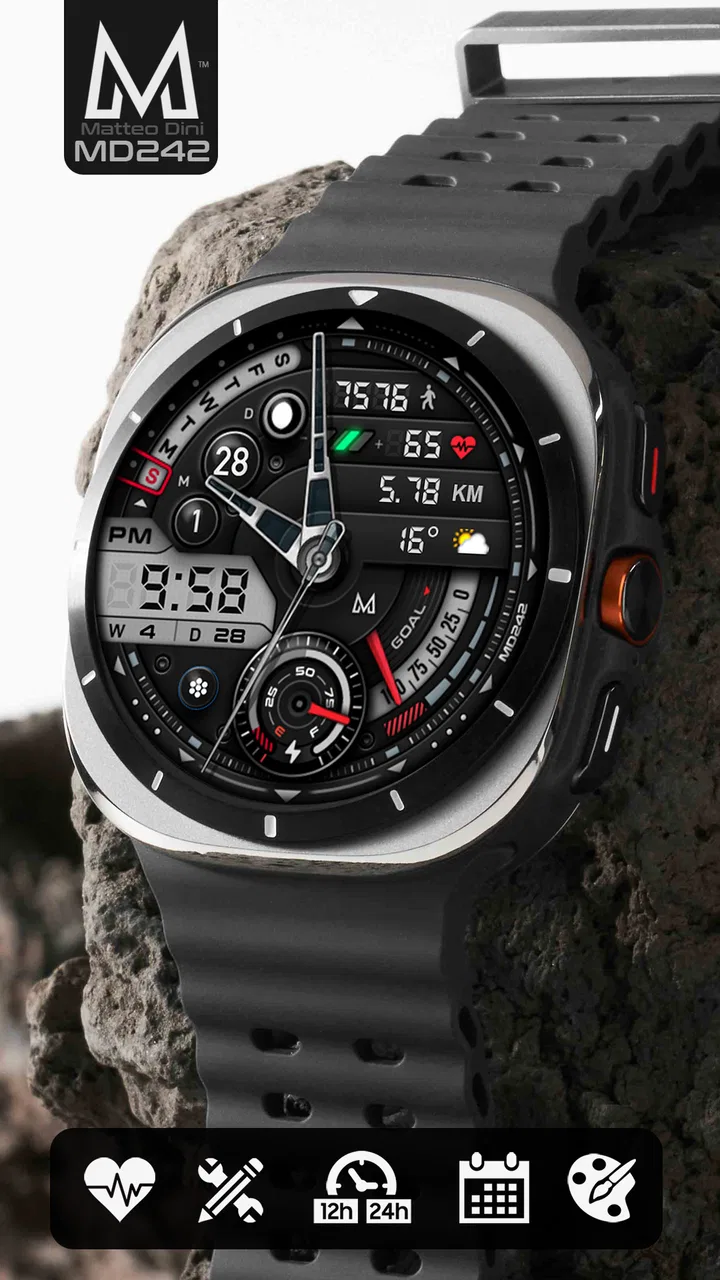
MD242 Hybrid watch face
- 4.5
- Rating
- 100.00K
- Installs
- $2.29
- Price
 Analysis by App-foxy
I spent time with MD242 Hybrid as a personalization app for Wear OS, and my first impression was that it is aimed at people who want their smartwatch to feel more like a traditional timepiece without giving up useful digital information. It comes from Matteo Dini MD ® Watch Faces, a developer focused on watch-face design, and the central idea is a hybrid layout: part classic dial, part modern information panel. That balance is more important than it may sound. A watch face is something I look at dozens of times a day, so small choices in contrast, spacing, and complication placement quickly become either helpful or irritating.
The app costs $2.29, carries an Everyone age rating, and has reached over 100 thousand installs. Its average rating sits at 4.5 from around 4.7 thousand ratings, with roughly 354 written reviews. Those figures suggest that the face has found a solid audience, but I would not treat popularity alone as proof that it will suit every watch or every wrist. The real question is whether you like its hybrid visual language and whether you are willing to spend a little time tuning the available options.
How MD242 Hybrid feels on a real Wear OS watch
MD242 Hybrid is best understood as a replacement for the standard face that came with a Wear OS watch. Instead of presenting a purely digital screen or a minimal analog dial, it combines the familiar presence of hands with configurable digital details. That makes it a practical choice for someone who wants to read the time at a glance but also wants the watch to show more than hours and minutes.
You May Also Like

 Blood Strike: 2.5 Anniversary
Blood Strike’s Loadouts Turn Every Drop Into a Tactical Gamble
A close look at Blood Strike’s custom loadouts: how fast access to signature weapons reshapes its battle royale rhythm, rewards preparation, and narrows the gap between fights.

 Pandora - Music & Podcasts
Pandora’s Music Is Easy to Start, but Harder to Recover
Pandora’s strength is its low-effort path from a seed to a station. Its weak spot is how much confidence it asks you to place in connection, setup, and quiet recovery.

 8 Ball Pool
8 Ball Pool Is Built on Rivalries, Rematches, and Routine
A close look at the rivalries, rematches, shared routines, and unanswered safety questions that turn a quick pool match into a persistent mobile community.

 Samsung Music
Samsung Music’s Quiet Strength Is Playing What You Already Own
Its reach comes less from spectacle than from dependable access to a personal library. That simplicity is both the app’s strongest retention engine and its ceiling.

 AccuWeather: Weather Radar
AccuWeather Review: A Quick, Clear Forecast for Everyday Decisions
For everyday plans, the best forecast is the one you can understand quickly. AccuWeather makes rain timing, radar, and local conditions easy to act on, with a few trade-offs.

 Hill Climb Racing
Why Hill Climb Racing Still Turns Crashes Into One More Run
A tiny car, a bumpy hill and one more upgrade: Hill Climb Racing keeps resurfacing because its simple chaos makes every near-miss feel personal.
More From Our News Desk



In everyday use, I found the hybrid approach especially suitable for mixed routines. During work, an analog-style center keeps the display from feeling like a tiny phone screen. When I am moving between appointments or checking my wrist while walking, the surrounding information can reduce the need to open another screen. The face works best when I decide in advance which details deserve permanent space and which can remain inside the watch's menus.
The store summary highlights customizable complications and many options, and that is the heart of the experience. Complications are not decorative extras here; they determine whether the face becomes a useful dashboard or an overcrowded dial. I would begin with only the information I genuinely check several times a day. A weather-related complication, a calendar shortcut, or an activity detail may be valuable, while filling every available position can make the display harder to read.
That is one of the less obvious trade-offs with a feature-rich watch face: more choice does not automatically mean a better result. The most attractive setup is often not the one with the greatest amount of information. I recommend creating a simple daytime arrangement first, using the face for a full day, and only then adding another complication if you repeatedly find yourself reaching for the watch to check something else.
Customization is useful when you approach it as a workflow
The customization process rewards a little patience. Rather than changing everything at once, I would treat the face like a small interface design project. First choose the overall visual style that makes the hands and primary time display easy to recognize. Next decide which complication positions match the way you actually use your watch. Finally, check the result in bright outdoor light, indoors, and at night if your watch supports different display behavior.
This matters because a configuration that looks balanced in a settings preview may feel busy once notifications, reflections, or movement enter the picture. A complication that is technically visible can still be too small to read comfortably while walking. I also recommend leaving one position unused if the layout starts to feel cramped. Empty space is not wasted space on a small screen; it gives the important elements room to stand out.
Another practical tip is to match the complication type to the location rather than choosing only by appearance. A glanceable item belongs in a position that can be read without searching around the dial. A shortcut that I use less often can sit farther from the center. This turns the face into a hierarchy instead of a collection of icons and numbers, and it makes the customization feel more intentional than simply trying every available option.
People who enjoy changing their watch face for different situations will probably appreciate this flexibility. I can imagine one arrangement for office hours, another for exercise, and a quieter version for evenings. The value is not just having many settings; it is being able to shape the watch around a routine. At the same time, users who want to install a face and never adjust anything may find the range of choices less exciting and more like homework.
Reading the display without losing the traditional feel
The hybrid design will appeal most to users who like the character of an analog watch but still want digital convenience. The hands provide a visual anchor, while the configurable areas can carry information that a traditional dial cannot. That combination feels more personal than the default faces that often come with a watch, particularly if the stock options are either too plain or too focused on fitness.
There is a limit, though. Hybrid faces ask the eye to process different kinds of information at once. If you rely heavily on tiny digital values, the analog portion may feel like visual competition rather than a benefit. Conversely, if you mainly want an elegant dial, the extra data areas may seem unnecessary. I would choose MD242 Hybrid for a watch that I use as both a timepiece and a quick information tool, not for a purely minimalist look.
A realistic example is a busy weekday morning. I may glance at the watch to see the time, notice a calendar detail, and decide whether I need to check my phone before leaving. With a sensible configuration, those checks can happen quickly. If I add too many complications, the same moment becomes slower because I have to distinguish several small elements. The face can support a faster routine, but only after I make deliberate choices about what stays visible.
Trust begins with what the app visibly asks me to control
For a personalization app, I pay attention to the boundary between changing the appearance of my watch and exposing information from the watch or phone. MD242 Hybrid is presented as a Wear OS watch face, so my confidence comes primarily from keeping the review focused on the controls I can see while configuring the face: the visual options, complication choices, and the way those choices appear on the watch.
I would still inspect the permission prompts shown during installation and setup on my own device before accepting anything. Android can present permissions differently depending on the watch, phone, and operating-system version, so I do not regard a general description of a watch face as a substitute for reading those prompts. If a requested access does not make sense for the complication I want to use, I would pause and investigate rather than approving it automatically.
This is also why I prefer setting up the face in stages. I can install it, observe which controls are available, and then enable only the complications that serve a clear purpose. That approach gives me a more trustworthy configuration because I am making visible choices instead of treating every optional element as necessary. The safest setup is the one I can explain to myself: what is displayed, why it is displayed, and which access I chose to allow.
Data-sensitive moments usually appear when a complication displays personal context, such as appointments, activity information, or other details drawn from the watch ecosystem. Even when the face itself is only presenting information, the screen can be visible to people nearby. I would avoid placing sensitive calendar details or private notifications in prominent positions if I regularly use the watch in meetings, public transport, or shared spaces.
That is not a criticism unique to this face. It is a practical consideration for any configurable Wear OS design. The advantage here is that the customization lets me decide how much information is exposed at a glance. The drawback is that the responsibility also sits with me. A face with many available complications can make it easy to reveal more than I intended unless I review the arrangement with privacy in mind.
Who will get the most from the purchase
I would recommend MD242 Hybrid to someone who has already found the default Wear OS faces limiting. It makes sense for a user who wants an analog-inspired appearance, checks several pieces of information throughout the day, and enjoys refining a layout. It is also a good fit for someone who sees a watch face as part of personal style rather than as a fixed utility.
The price of $2.29 is modest enough that the decision mainly depends on expected use. If I wear the watch daily and appreciate having one face that can adapt to work, errands, and leisure, the purchase is easy to justify. The value becomes weaker if I frequently rotate through free faces, prefer a very plain screen, or rarely use complications. In that case, the extra configuration may not change the experience enough to matter.
I would also be cautious if small text is difficult for me to read. A hybrid face can look attractive while still requiring more visual attention than a large, simple digital layout. The best alternative for that situation would be a face designed around oversized numerals and fewer information fields. Likewise, users who care primarily about a specialized sports dashboard may be better served by a face built specifically around workout metrics rather than a general-purpose hybrid design.
How it compares with ordinary alternatives
The default watch faces supplied with Wear OS watches usually win on convenience. They are already installed, familiar, and often designed to match the device's screen. MD242 Hybrid competes by offering a stronger sense of identity and more room to tailor the information layout. I would choose the default option when I need the least setup, but I would choose this one when the stock selection feels generic or fails to show the details I check most.
Minimal analog faces are calmer and often easier to read at a glance. They are a better choice when I want the watch to disappear into the background and simply tell me the time. MD242 Hybrid is more useful when I want the wrist display to do additional work, but that usefulness comes with more visual decisions and a greater chance of clutter.
Purely digital faces can be faster for exact time reading, especially during movement or in poor viewing conditions. They may also feel more modern and direct. The hybrid approach offers a different kind of satisfaction: it preserves the familiar shape and rhythm of a watch while adding digital flexibility. Neither style is universally superior; the right choice depends on whether I value instant numerical clarity or a richer, more traditional presentation.
There is also a difference between a face with many configurable options and one with a narrowly defined purpose. MD242 Hybrid gives me freedom to shape the display, but it does not remove the need to make those decisions. A specialized face may be better if I want a ready-made layout for one activity. This app is more compelling for people who want to decide what their watch should prioritize.
Small frictions worth considering before installing
The first friction is setup time. The face becomes more valuable after customization, but that means I cannot judge it fairly from the initial appearance alone. Users who dislike browsing settings may install it, see a layout that is not immediately perfect, and abandon it before discovering the arrangement that suits them.
The second is the tension between information density and legibility. Every added complication competes for attention with the hands and the primary time display. I would not call that a flaw in the concept, but it is a limitation that affects the final result. The watch's screen size, shape, and display quality will influence how comfortable the face feels, so my preferred arrangement may not be identical to yours.
The third concerns user control over visible information. Customization can reduce unnecessary exposure, but it can also encourage me to put too much personal context on the wrist. Before using calendar or activity-related complications, I would consider who can see my screen and whether a short glance could reveal information I would rather keep private. That kind of review should be part of setup, not an afterthought.
I would also keep expectations realistic about what a watch face can change. MD242 Hybrid can alter the watch's presentation and make selected information easier to reach, but it does not turn the watch into a different class of device. It will not replace a phone for detailed reading, and a complication remains dependent on the information available through the Wear OS environment. The face is most effective as a quick-glance layer, not as a full information center.
My considered verdict for everyday Wear OS use
After using MD242 Hybrid as a customizable personal-display app, I see its strongest quality in the balance between character and utility. It avoids the starkness of a purely digital screen while offering more flexibility than a fixed analog dial. The developer, Matteo Dini MD ® Watch Faces, has positioned it for people who want to make the watch face feel deliberately chosen rather than merely accepted.
I would install it on a Wear OS watch that I wear throughout the day, especially if I want a traditional look with practical information nearby. I would start with a restrained arrangement, test it in real situations, and add complications only when I can name the problem they solve. That workflow produces a cleaner result and gives me better control over what appears on my wrist.
I would skip it if my priority is a huge digital time display, a specialized fitness interface, or a completely automatic setup. In those cases, a simpler or more focused alternative is likely to be more comfortable. For everyone else, the purchase offers a reasonably priced way to reshape the everyday experience of a Wear OS watch.
My final view is positive but deliberate: MD242 Hybrid is worth considering because it gives me meaningful control over both style and glanceable information. Its best results come from thoughtful configuration, not from enabling every option. If you are comfortable making those choices—and if you review permissions, visible data, and privacy-sensitive complications before settling on a layout—I think it can become a dependable daily face rather than just another download.
FAQs for MD242 Hybrid watch face
01What is MD242 Hybrid watch face?
MD242 Hybrid is a Wear OS watch face that combines a traditional analog dial with useful digital information. It is designed for compatible Android smartwatches and typically provides at-a-glance details such as the time, date, battery level, and activity data. Its hybrid layout is intended for users who want a classic watch appearance without giving up the convenience of smartwatch information.
02Which smartwatches are compatible with MD242 Hybrid?
MD242 Hybrid is intended for Wear OS smartwatches, but compatibility can depend on the watch model, operating-system version, and the way the face is distributed through Google Play. Before downloading, check the supported-device list and confirm that your watch uses Wear OS rather than a proprietary platform. Devices running systems such as watchOS, Fitbit OS, or many basic fitness-watch platforms may not support it.
03Can MD242 Hybrid be customized?
The available customization options depend on the version installed and the features enabled by the developer. In general, users may be able to change colors, accent styles, complications, or displayed information, while some elements may remain fixed to preserve the intended design. After installation, open the watch-face settings from the Wear OS app or directly on the watch to review the available choices.
04Does MD242 Hybrid affect battery life?
Like any third-party watch face, MD242 Hybrid can have some effect on battery consumption, especially when it uses animated elements, frequently updated complications, or fitness and weather information. The actual impact varies by smartwatch, screen technology, brightness, and usage habits. If battery life becomes a concern, reduce unnecessary complications, disable animation where possible, and use the watch’s battery-saving settings.
05How do I install and use MD242 Hybrid watch face?
Install MD242 Hybrid through the official Google Play listing using a compatible Android phone or Wear OS watch, then select it from the watch-face collection in the Wear OS companion app or on the watch itself. Some complications may require permission to access activity, weather, or calendar information. Review requested permissions carefully, and make sure the watch is connected and synchronized before applying the face.
Pros
- Clean hybrid layout combines digital precision with classic analog styling.
- Offers quick access to essential information without opening another app.
- Readable time display remains useful in both casual and active settings.
- Works well with different watch bands and everyday outfit styles.
- Useful choice for users who prefer a practical
- uncluttered watch face.
Cons
- Some details may appear small on watches with compact screens.
- The hybrid design may feel too traditional for users wanting a modern look.
- Available customization can be limited compared with highly configurable faces.
- Battery impact may vary depending on complications and display settings.
- Certain features may depend on Wear OS version or connected apps.

MD242 Hybrid watch face
Gallery